TABLE OF CONTENTS
1. Purpose of the Optimiser
The optimiser in the Insights Platform finds the best allocation of marketing investment (only on paid media variables) to maximize profit or achieve a target KPI, subject to your business rules. Instead of testing many plans manually, the optimiser computes an optimal plan that respects budgets, minimum/maximum bounds, bundles, and timing rules.
Typical questions it answers:
- “Given a budget of ₹X next quarter, what split across channels gives the highest profit?”
- “Can we meet a target revenue with the least possible spend while keeping publishers/regions within bounds?”
How it relates to the Simulator: The Simulator shows what happens if you change inputs; the Optimiser searches which inputs (spend by channel/week, etc.) deliver the best outcome under your constraints. The two are powered by the same MMM foundation, but serve different needs.
2. The Optimisation Process
At a high-level, the optimiser:
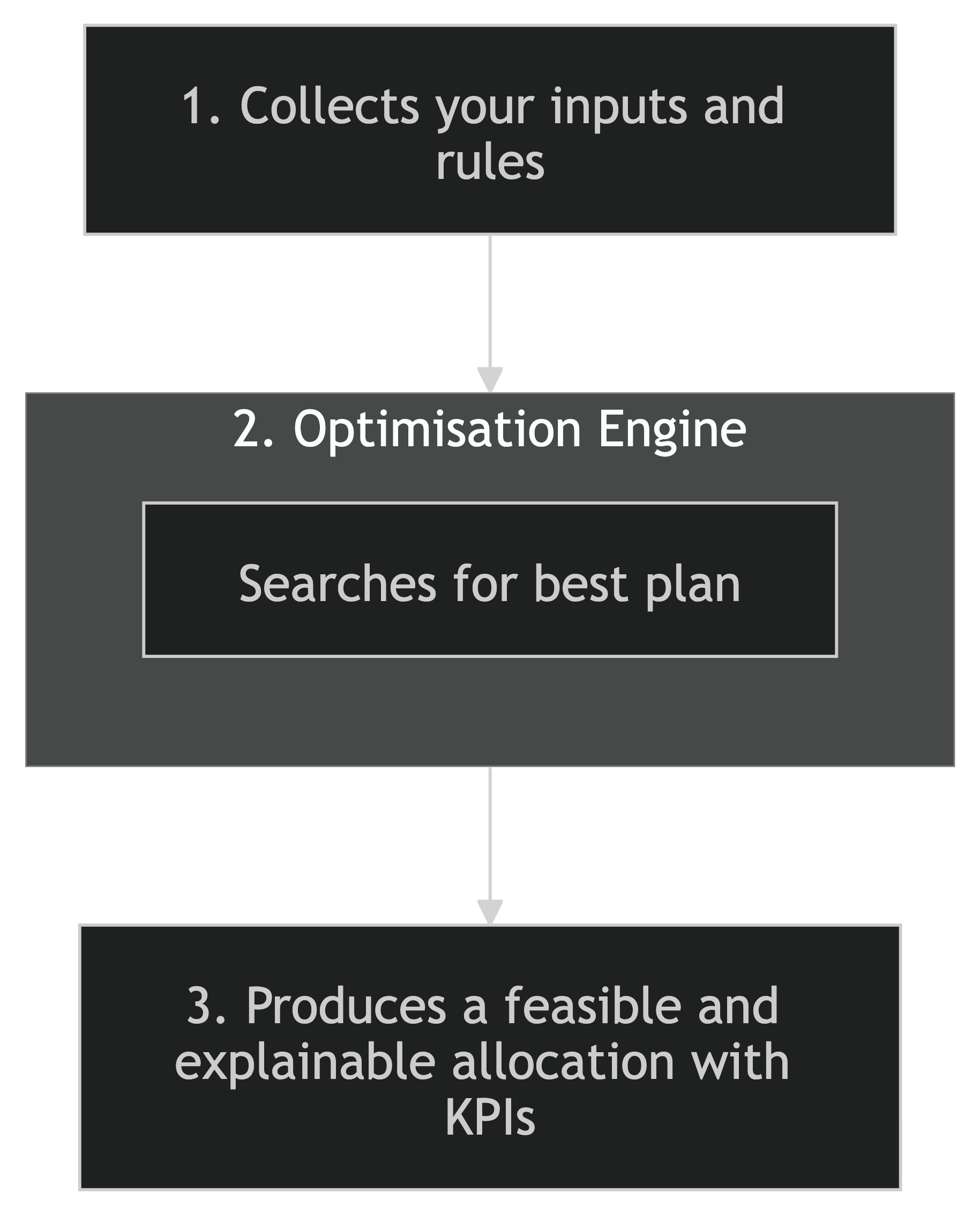
Step 1 – Inputs
A. Baseline Inputs
These define your modelling context and current state:
- Historic media cost/exposures, to‑net factors, profit margins, and other non‑media drivers used by the MMM; plus the modelling container (“mec”) that carries learned effects.
B. Constraints & Objectives
- Objective: Usually maximize profit (KPI × profit margin) for a given budget; or minimize spend to reach a target KPI (target optimisation).
- Global budget: Sum of all decision variables equals total investment.
- Epoch constraints: Per‑period min/max (e.g., “TV spend ≤ ₹5,000 daily”).
- Bundle constraints: Min/max over a group of variables (e.g., “Search+Social ≥ ₹75,000 daily”).
- Fixed‑spend windows: Exact amounts for specific groups/time windows when needed.
Where you set rules: The Constraints Management System (epoch/spend) and the Insights Platform (bundle constraints).
Step 2 – The Optimisation Engine (Simplified)
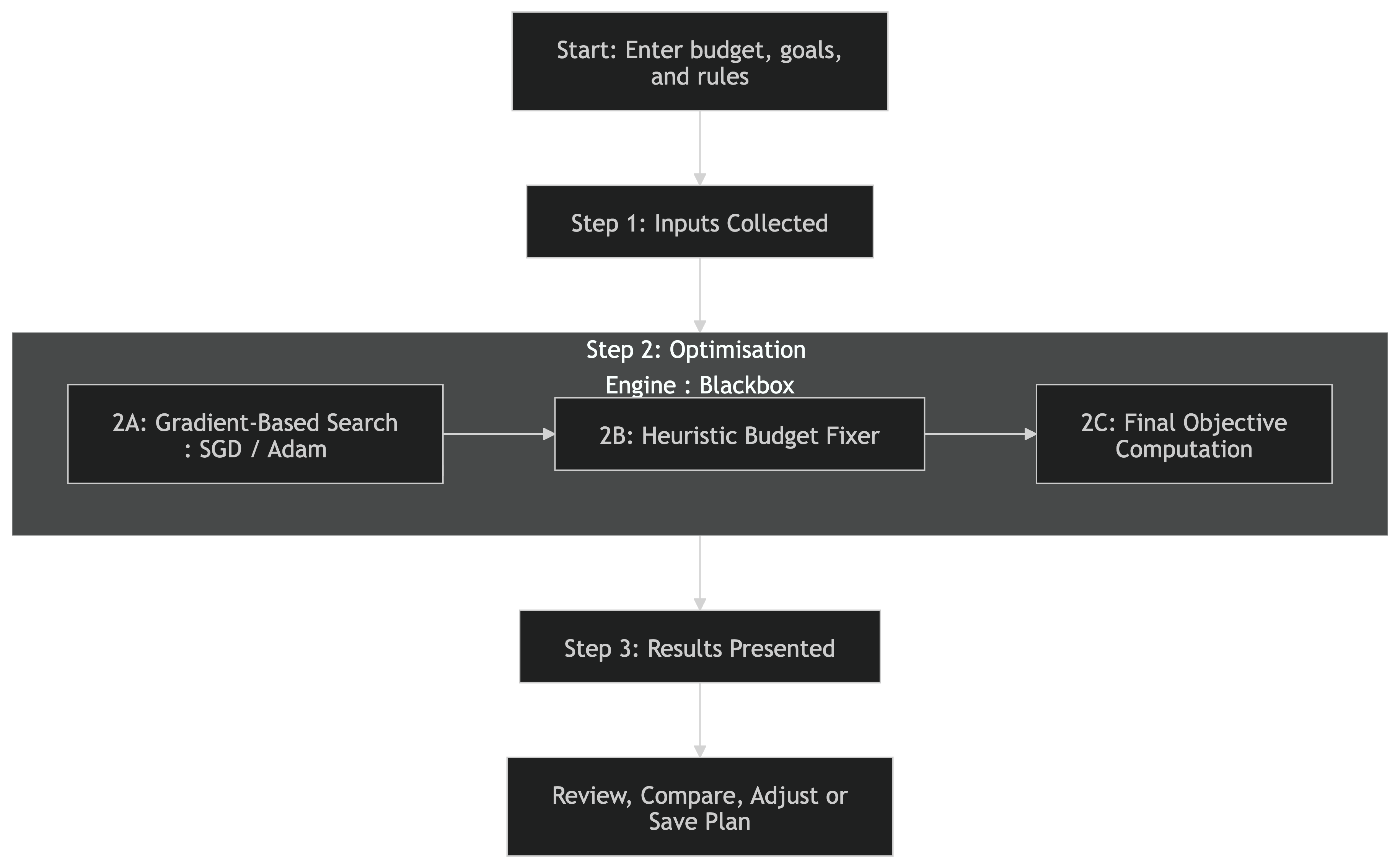
From your perspective, it’s a black box that returns the best plan. Inside, it runs two coordinated layers:
A. Gradient-Based Search (SGD/Adam)
- What happens:
The engine starts by exploring lots of possible ways to split your budget across channels and time periods (for example, how much to spend on TV in Week 1, Digital in Week 2, and so on).
- How it searches:
It uses a method called Stochastic Gradient Descent (SGD), with a smart upgrade called Adam. Think of this as a way for the system to “learn” quickly which budget splits are likely to give you the best results, by making small, intelligent adjustments each time.
- Why it’s robust:
The engine doesn’t just rely on one set of assumptions. It samples from many possible scenarios (using what’s called the “posterior” from the marketing mix model), so its recommendations reflect both what’s likely and what’s possible.
- Managing risk:
There is a setting called risk-averseness (alpha, from 0 to 1). If you want a safer plan, the optimiser can avoid risky options that might have unpredictable results.
- Respecting your rules:
All your constraints like budget limits, minimum or maximum spends, or bundles are built in as “soft constraints.” If a plan starts to break a rule, the optimiser gently steers it back on track.
- Keeping things stable:
The optimiser uses “learning rates” that slow down over time, so it does not overshoot the best answer. If it notices the plan is bouncing around too much, it automatically takes smaller steps.
- Accounting for carryover:
The engine also considers the effect of past and future spend (using “padding periods”), so your plan doesn’t have any odd jumps at the start or end.
B. Heuristic Budget Fixer (Greedy Feasibility)
- Why it’s needed:
After the first search, the plan is usually very close to perfect, but sometimes it might slightly break a rule (for example, spending just over the maximum allowed in one area).
- How it fixes things:
The Heuristic Budget Fixer is a fast, rule-based system that checks every constraint and makes quick, sensible adjustments to bring the plan fully in line with your requirements.
- How it decides what to fix first:
It looks at which rules overlap the least with others (for example, a rule that only affects one channel), and fixes those first. This avoids creating new problems while solving others.
- How it adjusts:
Once a rule is satisfied, the affected budget is “frozen”, and the fixer moves on to the next rule. It uses simple logic to keep each spend as close as possible to the original plan, while always staying within your limits.
- Types of rules handled:
It can handle all sorts of constraints: totals, minimums, maximums, and even paired rules (like “at least X but no more than Y”).
- Why it’s efficient:
This approach is much faster than traditional methods, fixing even large and complex plans in just a few seconds.
C. Final Objective Computation
- What happens last:
Once the plan is fully feasible (all your rules are met), the engine does a final check. It runs the plan through the model again, using a larger number of scenarios (for example, 500 samples) to get a stable and reliable estimate of your expected results.
- What you see:
You get clear numbers for your key goals like profit, sales, or ROI based on the final, feasible plan. This gives you confidence that the plan is both practical and likely to deliver the results shown.
Step 3 – Output Generation
When your optimisation is complete, you will see a comprehensive results page that helps you understand and compare different plans. Here is what you can expect:
What You’ll See
- Your Plan:
The plan you set up, including all your chosen constraints and rules.
- Your Plan with No Constraints:
The same plan, but with all media constraints removed. This shows the best possible outcome if there were no limits.
- Suggested Alternative:
A system-generated plan using 90% of your original investment, with the same constraints. This helps you see the effect of spending a little less.
Reviewing Results
- Key Performance Indicators (KPIs):
Easily compare important figures like media investment, profit, cost per action, and ROI.
Colour-coded arrows show increases (green) or decreases (red) compared to your original plan.
- Sales Forecasts with Confidence Intervals:
For example:
- “With 90% certainty, at least 652 tickets will be sold.”
- “With 10% certainty, up to 921 tickets may be sold.”
- Interactive Visuals:
You can view breakdowns by channel, campaign type, publisher, or other categories.
Graphs and tables update as you explore, making it easy to see where your budget is going and what results to expect.
- Modify and Save:
You can adjust your inputs and re-run the optimisation at any time.
Save your plan privately or share it with your team.
Once activated, you can track actual performance against predictions.
3. An Example
Inputs
- Budget: ₹1,00,00,000 for Jan–Mar
- Objective: Maximise profit (Sales × margin)
- Constraints:
- Digital ≥ 30% of total; Print ≤ 15% of total (bundle)
- TV daily cap ₹5,00,000 (epoch)
- Search = ₹25,00,000 in February (fixed‑spend window)
Inside the Engine
1) SGD/Adam explores spend moves using MMM effects, applying soft penalties to keep within budget and bounds.
2) Heuristic Budget Fixer orders constraints by overlap, locks solved variables, and applies rule‑based fills so all bundles/epochs/windows are satisfied.
Outputs (illustrative):
- Your Plan:
The recommended split (e.g., 50% digital, 35% TV, 15% print), with all your rules applied.
- Your Plan with No Constraints:
What the system would suggest if there were no minimums or maximums—perhaps a higher digital spend if that’s most effective.
- Suggested Alternative:
A plan using 90% of your budget, showing how a slightly lower investment might affect your results.
- KPIs and Forecasts:
For each plan, you’ll see projected profit, cost per action, ROI, and sales forecasts with confidence intervals.
- Breakdowns and Visuals:
Interactive charts let you see spend and results by channel, publisher, or campaign type.
4. Data & Modelling Considerations
- MMM foundation: The optimiser sits on the MMM that models adstock/saturation and other drivers; quality depends on the historical data used to estimate effects.
- Future periods & padding: Forecasted values (e.g., to‑net factors) and padding windows help capture carryover; they introduce some uncertainty vs. realised future performance.
- Uncertainty & risk: The risk‑averseness (α) setting trades off aggressive ROI vs. robustness to model uncertainty.
- Feasibility at scale: The Heuristic Budget Fixer is designed to remain fast as the number of variables and constraints grows, with rule‑based transparency for auditability.
5. FAQs
Q1. How is this different from “simulation”?
Simulator: You choose the plan; it predicts outcomes.
Optimiser: It chooses the plan for the best outcome under your rules. They are complementary.
Q2. Can it enforce publisher or geo minimums?
Yes, use bundle or epoch constraints (min/max/fixed) by group and period.
Q3. What if the optimiser suggests a plan that looks “edgy”?
Increase risk‑averseness (α) to penalize volatile solutions, or tighten constraints (e.g., higher minimums on strategic lines).
Q4. How fast is it?
SGD scales well; the Heuristic Budget Fixer completes feasibility in seconds even on large instances, thanks to greedy rule‑based filling (dominant cost ~sorting).
Was this article helpful?
That’s Great!
Thank you for your feedback
Sorry! We couldn't be helpful
Thank you for your feedback
Feedback sent
We appreciate your effort and will try to fix the article